Translate Word documents online with the formatting kept
Upload a .docx file and download it in another language with its styles, tables, bold text, colours and text boxes exactly as they were. The text is replaced inside the existing formatting, so there is nothing to fix afterwards.
- Formatting untouched: styles, fonts, colours and bold text stay as in the original.
- Tables and text boxes: translated inside their cells and frames.
- Your terms: add a glossary and earlier translations so approved terms are used.
$0.005 per word, no subscription. See the exact price before you pay; editing by hand is free.
A real result: a Word file translated into German
The test product sheet as a Word file, translated on Linigu and opened in Word.
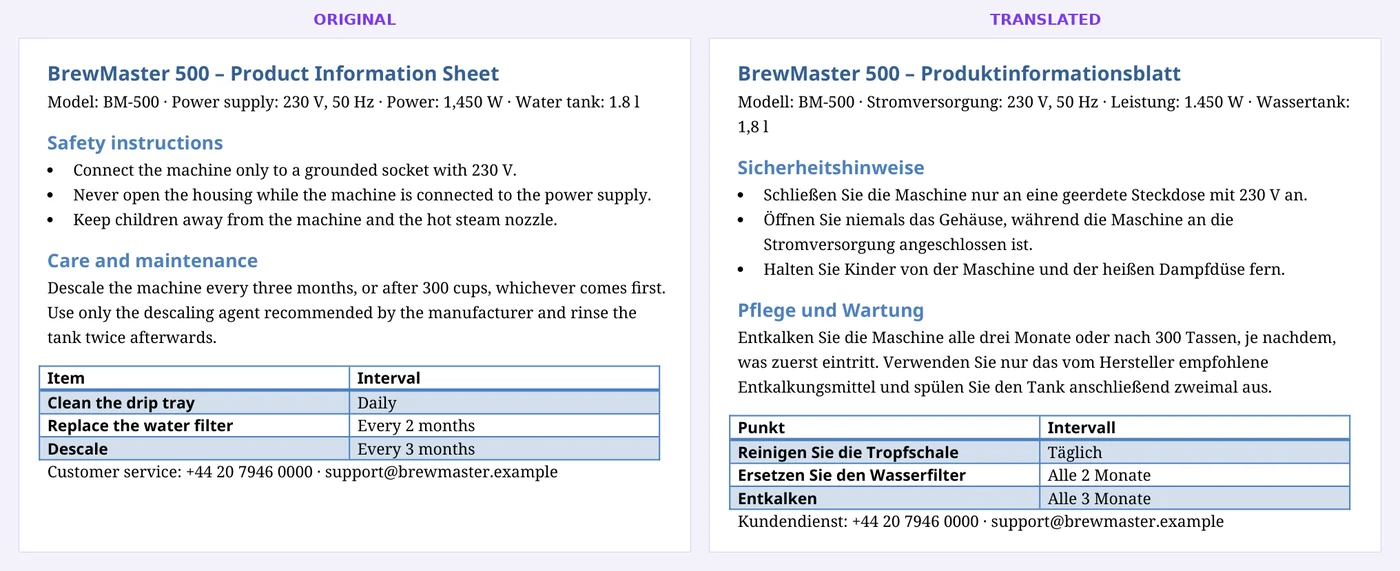
Unedited output. Heading colours, the bold table header and row shading are unchanged.
How Word translation works
- 1
Upload the .docx
Drop the Word file. You see the word count and the price straight away.
- 2
Choose languages and style
Pick the target language, formal or informal style, and optionally a glossary or earlier translations.
- 3
Download or review
Download the translated .docx, or review it sentence by sentence in the online editor first.
What stays the same
- Paragraph and character styles, fonts and colours
- Bold, italic and underlined words
- Tables, including shading and borders
- Text boxes and bullet lists
- Images and page layout
Good to know
- Headers, footers and footnotes currently stay in the original language.
- Old .doc files: save them as .docx in Word first.
- Text inside images is not translated.
Frequently asked questions
Does the formatting really stay the same?
Yes. The text is replaced inside the existing formatting runs, so styles, fonts, colours and tables are untouched. Longer words simply make lines a little longer.
Can I use my own terminology?
Yes. Upload a glossary (Excel, CSV, Word or TXT) and earlier translations as parallel text (Word or TXT). Approved terms are used, and sentences that were already translated are reused for free.
Can I translate it myself instead?
Yes. Choose "Translate it yourself" to work in the free online editor and download the finished Word file.
How much does it cost?
$0.005 per word of the original. A 5,000-word document costs $25. You see the exact price before you pay.
Is my document used for AI training?
No. Files are processed for the translation only and deleted automatically after 48 hours.
More ways to translate
Translate your Word document now
Upload the file, check the price and the layout preview, then decide. No subscription, no installation.
Upload your file