Translate PDF files online and keep the layout
Upload a PDF and get it back in another language, page for page: headings, tables, columns and colours stay where they were. You see the word count, the price and a layout preview before anything is charged.
- Same pages, same places: each line is translated and written back in its original position.
- Longer text fits: a longer translation uses the free space next to it before the font gets smaller.
- Review before download: open the result in the free online editor and correct any sentence.
$0.005 per word, no subscription. See the exact price before you pay; editing by hand is free.
A real result: English PDF translated into German
A one-page product sheet with a coloured heading, bullet list and shaded table, translated on Linigu. Original on the left, translation on the right.
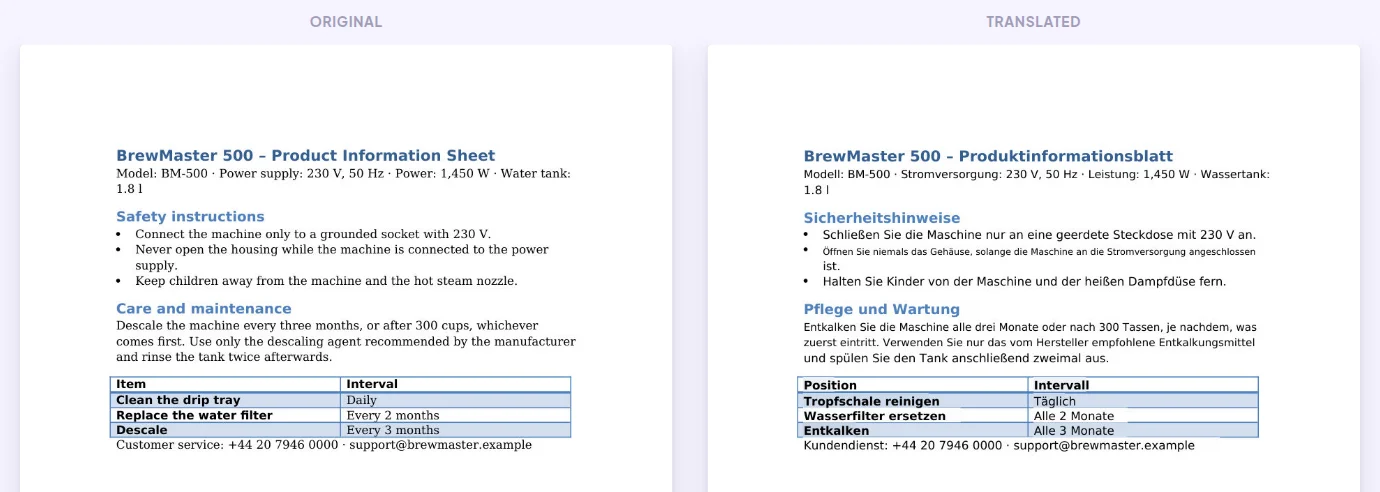
Unedited output of the test file (114 words, $0.57).
How PDF translation works
- 1
Upload the PDF
Drop the file in the box. You immediately see the word count, the price and a preview of how the layout will look.
- 2
Choose the languages
Pick the target language (and the source, or let it be detected). Optionally add a glossary so your terms are used.
- 3
Download or review
Download the translated PDF, or open it in the online editor to check every sentence first.
What stays the same
- Page size, page count and the position of every line
- Tables, columns and table shading
- Text colours, headings and bullet points
- Images, logos and drawings
- Numbers, e-mail addresses and links
Good to know
- The original fonts are replaced by a clean standard font, because fonts embedded in a PDF usually contain only the letters of the original text.
- Text that is part of an image (a logo or a photo of a sign) is not translated.
- If you have the original Word or PowerPoint file, translate that instead: text flows freely there and nothing has to shrink.
Frequently asked questions
Will the translated PDF look like the original?
Yes. Every line is written back in its original position, so tables, columns and colours stay in place. Only the font changes to a standard one.
What happens when the translation is longer?
The text first uses the free space to its right, up to the next column or table border. Only when there is no room does the font become slightly smaller.
Can I translate a scanned PDF?
Yes. Pages without text are read with OCR and translated in place. See translate scanned PDFs.
How much does it cost?
$0.005 per word of the original. A 2,000-word PDF costs $10. You see the exact price before you pay, and you only pay for what you translate.
Is my document safe?
Files are processed for the translation only, are not used to train AI models and are deleted automatically after 48 hours.
More ways to translate
Translate your PDF now
Upload the file, check the price and the layout preview, then decide. No subscription, no installation.
Upload your file