Translate scanned PDFs and photos with OCR
A scan has no text, only a picture of it. Linigu reads the page with OCR, translates every line and writes it back onto the original page, so the result still looks like your document. Works for scanned PDFs and photos (JPG, PNG).
- OCR included: no separate text recognition step and no extra cost.
- Tables stay tables: table lines and shading are ignored while reading, so cells come out right.
- Translated in place: each line is written over the original, on the original page image.
$0.005 per word, no subscription. See the exact price before you pay; editing by hand is free.
A real result: a scanned page translated into German
The same product sheet, printed and scanned slightly crooked and grainy like a real office scan, then translated on Linigu.
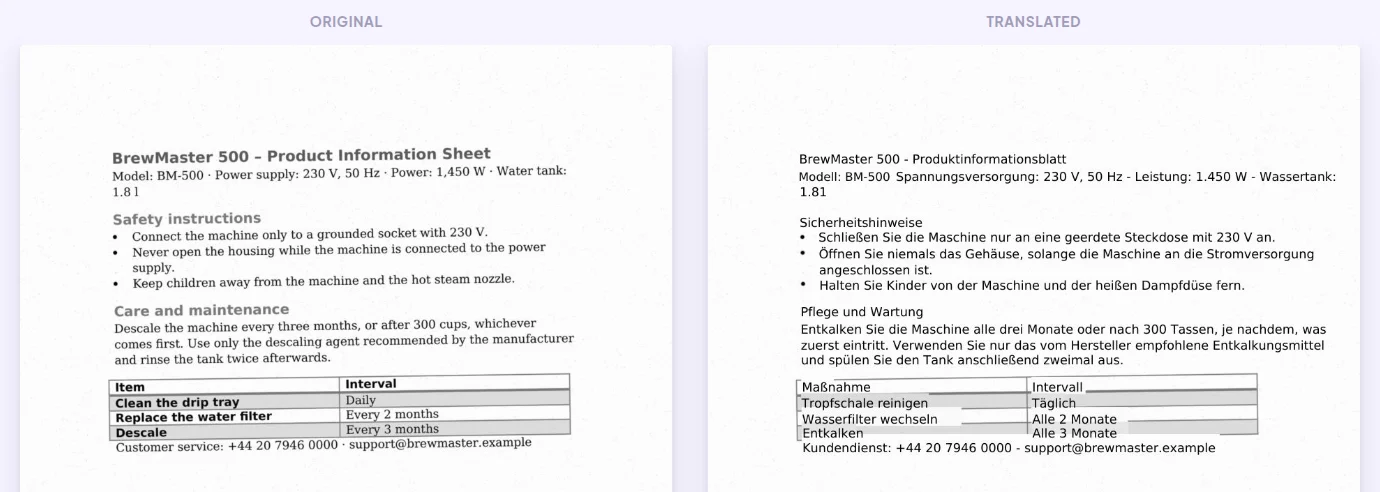
Unedited output. Original scan on the left, translation on the right.
How scan translation works
- 1
Upload the scan or photo
Drop a scanned PDF or a JPG/PNG photo. The pages are read with OCR and you see the word count and price.
- 2
Set the languages
Choosing the source language helps OCR read accented letters and other alphabets correctly.
- 3
Download or review
Download the translated PDF, or check each line in the online editor before you download.
What you get
- The original page image with the translation written in place
- Tables, row shading and the page layout
- Numbers, phone numbers and e-mail addresses as they were
- Up to 50 scanned pages per file
- A PDF you can print or send
Good to know
- Handwriting is not read reliably; printed text works best.
- Bold and the original typeface cannot be reproduced on a scan; the translation uses a clean standard font.
- Sharp scans at 300 dpi give the best results. Blurry phone photos may miss words.
Frequently asked questions
Can I translate a photo of a document?
Yes. Upload a JPG or PNG photo; it is read with OCR like a scanned PDF and you get a translated PDF back.
Which languages can OCR read?
Latin, Cyrillic, Greek, Arabic, Hebrew, Devanagari, Chinese, Japanese, Korean and more. Choose the source language for the best recognition.
Does it work for official documents?
It gives you a readable translation of the content. For authorities you usually need a certified translation; write to info@linigu.com.
How much does it cost?
$0.005 per word that is recognised on the page. OCR is included. You see the price before you pay.
Can I check the OCR result?
Yes. Open the translation in the free online editor: every recognised line is shown next to its translation, and you can correct both.
More ways to translate
Translate your scan now
Upload the file, check the price and the layout preview, then decide. No subscription, no installation.
Upload your file